If you are starting work in a QC or R&D lab, or applying for one, there is a good chance the HPLC or UPLC there uses Waters Empower software. On your first day someone shows you where to click to run your samples. The clicks are easy to copy. What the clicks belong to is harder.
I had the same problem in my early days in industry. Empower has a lot of parts, the names sound alike, and it took me a long time to see how the parts connect.
This guide is the big picture, in writing. It covers the same ground as the first two videos of my Empower series, so you can watch, read, or both. Once you know what Empower is made of, the buttons start to make sense.
The software details are for Empower 3. Where I say “the guide”, I mean the Waters Empower 3 Getting Started Guide (715005480, Rev. A, 2017).
One example, all five parts
I’ll use one job through the whole guide. Your supervisor asks you to assay caffeine in a batch of tablets.
First you need a place to keep everything for that job. In Empower that place is the project.
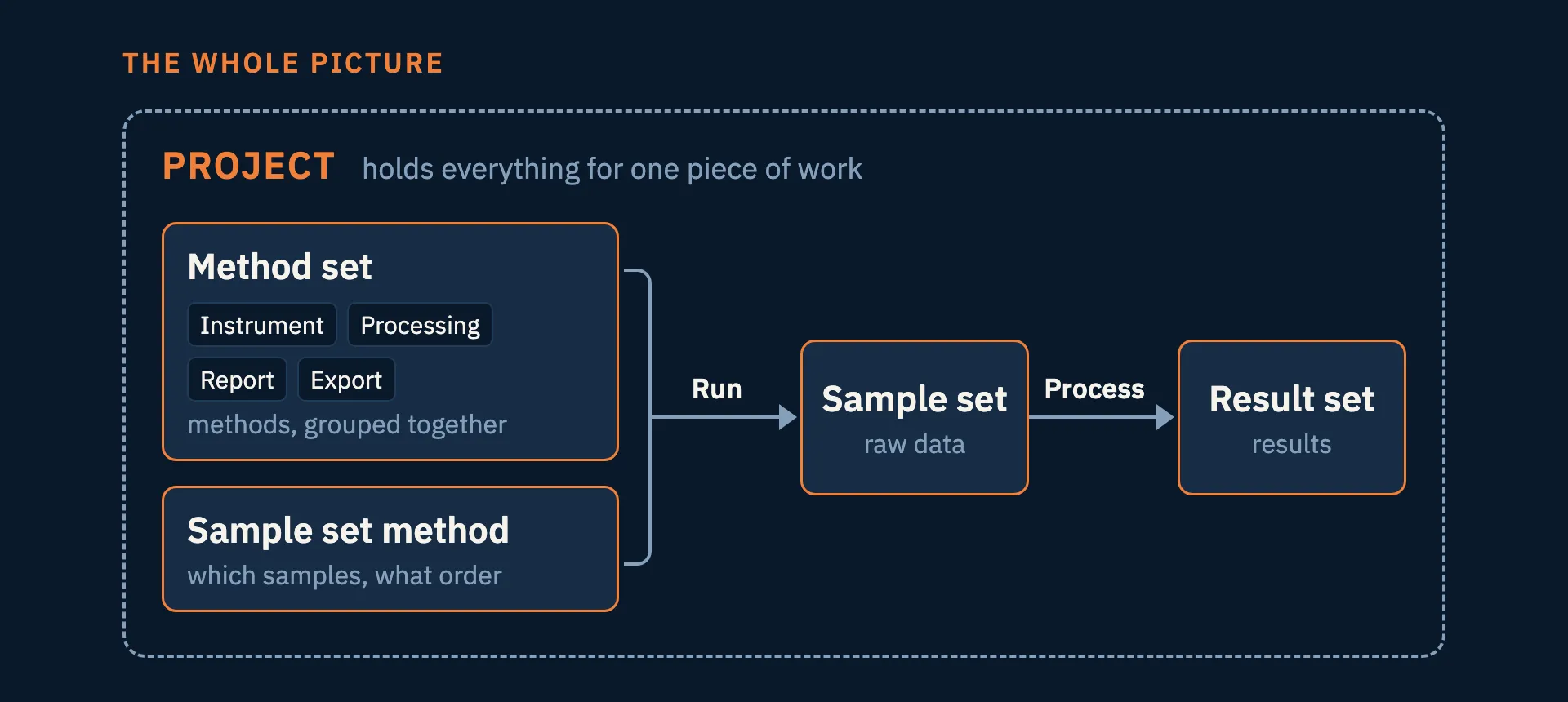
Inside the project you write instructions: how the instrument should run, how the peaks should be integrated, what the report should look like. Each of these is a method. You group the methods together into a method set.
Then you tell Empower which samples to inject and in what order. That is the sample set method. You run it and you get raw data. You process the raw data and you get your results, the result set.
So the five words are project, method, method set, sample set method and result set. Every window you open in Empower belongs to one of them.
This is the diagram I asked you to remember in the video. It comes back in every part of the series, so keep it in mind as you read the rest.
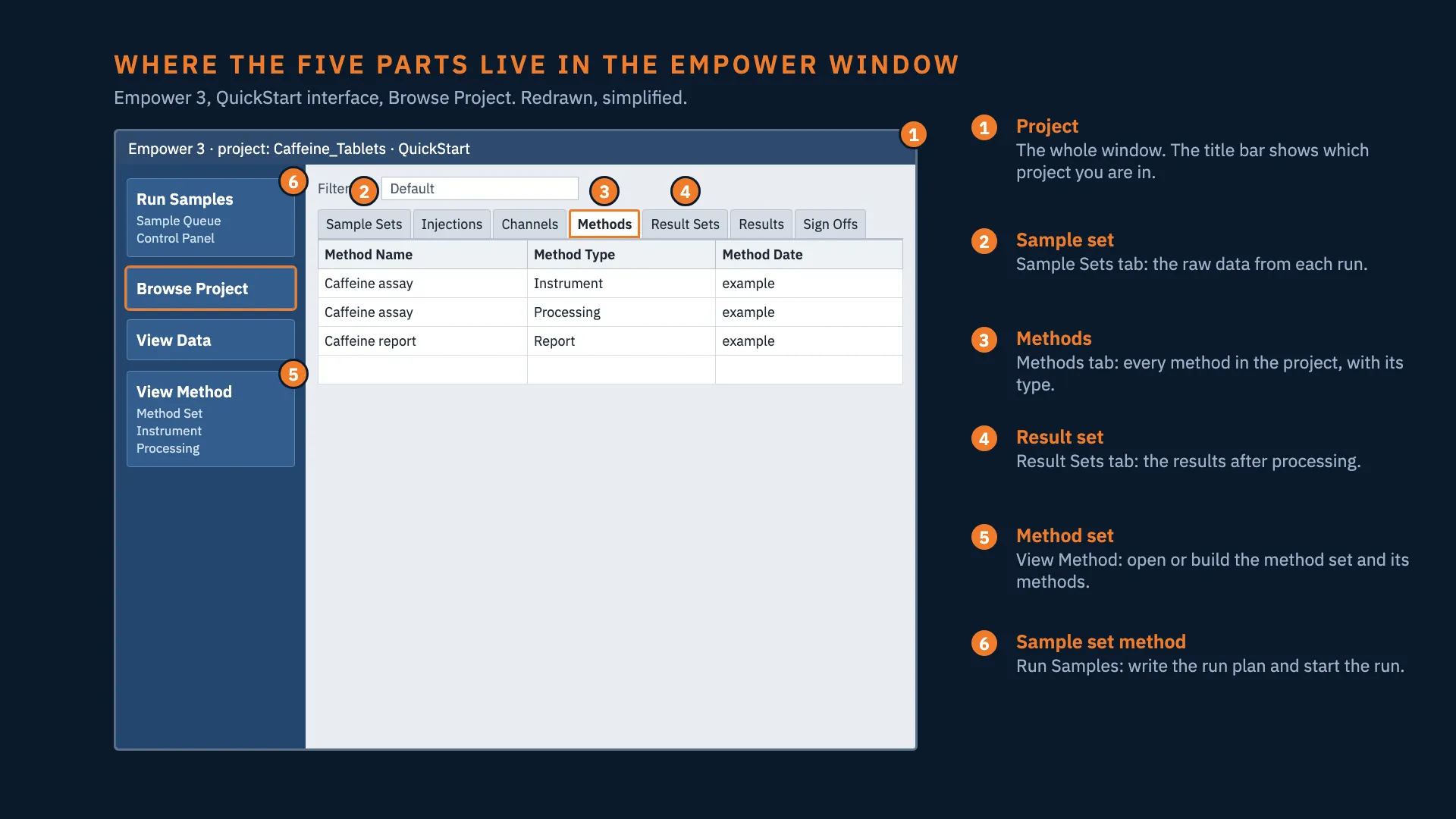
And this is where each of the five parts is in the Empower window. The tab and button names are the ones in the Empower 3 QuickStart interface.
The project is the container
The guide calls the project the basic unit of Empower. I think of it as a lab notebook for one piece of work. It holds your methods, results, peaks, custom fields and raw data. It can also hold the audit trail and the sign-offs.
One detail surprised me when I learned it. Everything in the project except the raw data is stored inside the Empower database. The raw data is stored in a separate directory. So copying a folder does not give you a backup of a project. Empower has its own backup and restore for projects, and that is the one to use.
Projects are also separate from each other. Methods you write in one project are not in another project.
A method is a set of instructions
In Empower, a method is a set of instructions for one task. There are four kinds you meet first:
| Method | What it holds | In the caffeine assay |
|---|---|---|
| Instrument method | Settings for the pump or solvent manager, autosampler, detector and column oven | Flow rate, gradient, wavelength, injection volume, run time |
| Processing method | How to integrate peaks, calibrate, and identify each component | Integration settings, the caffeine calibration, the caffeine peak name and retention time |
| Report method | The layout of the report | What the printed or PDF report shows |
| Export method | Which data leaves Empower, and in which format | For example a PDF or ASCII export |
Each method exists on its own. The instrument method does not know anything about the processing method. Something has to bring them together.
The method set brings the methods together
A method set is a group of methods that belong together. Because they are grouped, Empower can inject a sample, integrate it, quantify it and print the report one after the other, and you don’t have to do each step by hand.
To make even one injection, you need a method set with an instrument method in it. The other methods are optional for acquisition. Without the instrument method, Empower has nothing to send to the instrument and no data is acquired. The guide states this as the minimum requirement.
The sample set method is the run plan
This is the one people most often mix up with the method set.
I think of the sample set method as the sequence table you would write on paper before you start. It says:
- which samples, and in what order
- how many injections of each, at what volume, and how long each run is
- what each line is for: inject standards or inject samples, and when to equilibrate, calibrate or quantitate
- which method set each line uses
For the caffeine assay, the sample set method is where you list your caffeine standards and your tablet samples in the order you want them injected. The hardware settings are not in it. They are in the instrument method.
Which one points at which
This is the part that made it clear for me.
The sample set method points at the method set. Each line in the sample set method names the method set it should use, and the method set carries the instrument method to the hardware.
It does not work the other way. A method set does not know which sequence it is in. So one short way to say it:
The method set says how to run. The sample set method says what to run, and names the method set.
There are two practical reasons it is built this way.
The first is reuse. You write the method set once, and every sequence that needs those conditions uses it. Change the gradient in the caffeine method, and the next sequence that uses that method set gets the change.
The second is that one run can change conditions partway through. Different lines in one sample set method can use different method sets. So you can equilibrate the column with one method set and run your samples with another, and it is still a single run. The guide’s own advice is to let one sample set method do the whole job: run, calibrate, quantitate, check suitability, report and export.
Empower uses the word “set” three times
This is what confused me most, and it still confuses a lot of people. Empower uses “set” for three different things:
| Name | What it is | When it exists |
|---|---|---|
| Sample set method | The plan | Before the run |
| Sample set | The raw data: every injection and every channel from the detector | After you run the plan |
| Result set | The results | After you process the sample set |
Plan, then data, then results. When a colleague says “the set”, ask which of the three they mean. The conversation gets much easier.
Which one to open when something is wrong
The mistake I would watch for is opening the wrong one to fix a problem. The names sound alike, and both are instructions, so it is easy to waste time here.
| The problem | Open this |
|---|---|
| Flow, gradient, wavelength, column temperature, injection volume in the method | Instrument method (through the method set) |
| Peaks integrated wrongly, wrong calibration, peak not named | Processing method |
| Wrong vial order, a sample marked as a standard, wrong number of injections | Sample set method |
| Report shows the wrong fields | Report method |
There is also a sample set method template. It keeps the parts that stay the same between runs and asks you for the parts that change. If you run the caffeine assay every week, set up a template once.
One project setting that matters in a regulated lab
When someone creates a project, they decide whether Full Audit Trail Support is on. They also decide whether Empower asks for a reason every time you save a changed method, result or sample.
If comments are not required, Empower still records the change. It just does not ask you why. So this setting decides whether the reason is recorded, and that choice is made once, by the person who sets up the project. It applies to every user of that project.
A habit for your first weeks
Every time you open a screen in Empower, ask yourself which of the five it belongs to. Am I writing instructions? Am I looking at raw data? Am I looking at results?
That one question removes most of the confusion. It is what I wish someone had told me in my first weeks.
If you want to see this on a real instrument, I run a free live session once a month, with the camera on a Waters system and Empower on the screen. The next parts of the video series cover the processing method and how Empower integrates peaks. For integration choices on overlapping peaks, see perpendicular drop or tangent skim.
Sources
- Waters, Empower 3 Getting Started Guide, 715005480 Rev. A, 15 August 2017: §1.1.1 Key concepts and Table 1-1 Types of methods (pp. 6–10); project creation and Full Audit Trail Support (p. 120).
- The window drawing is redrawn and simplified from Figures 3-5 and 3-6 of the same guide (pp. 21–22). It is not a screenshot.
- The caffeine tablet assay is a teaching example. The sequence values in the videos are examples, not a validated method.
Empower is a trademark of Waters Corporation. This guide is my own explanation and is not produced or reviewed by Waters.
Common questions
- What is the difference between a method set and a sample set method in Empower?
- The method set is a group of methods (instrument, processing, report, export) and says how to run and process an injection. The sample set method is the run plan: which samples, in what order, how many injections, what volume, how long each run is, and which method set each line uses. The sample set method points at the method set, not the other way round.
- What is the difference between a sample set method, a sample set and a result set?
- The sample set method is the plan. When you run it, Empower collects a sample set, which is the raw data from every injection and every channel. When you process the sample set, you get a result set, which holds the results. Plan, then data, then results.
- What is the minimum you need to make one injection in Empower?
- A method set that contains an instrument method. The processing, report and export methods are optional for acquisition. Without the instrument method, Empower has nothing to send to the instrument and no data is acquired.
- What is a project in Empower?
- A project is the container for one piece of work. It holds your methods, results, peaks, custom fields and raw data, and it can also hold the audit trail and sign-off information. Everything except the raw data is stored in the Empower database. The raw data is stored in a separate directory, so copying a folder is not a backup. Use Empower's own project backup and restore.
- I need to change the flow rate or the wavelength. Which one do I open?
- The instrument method, which you reach through the method set. If the problem is the order of the vials, which vial is a standard, or how many injections, open the sample set method instead.
- Does Empower record changes if comments are not required?
- Yes. When a project is created, the person creating it decides whether Full Audit Trail Support is on and whether a reason is required when you save a changed method, result or sample. If comments are not required, Empower still tracks the change. It just does not ask you why.